
PDQ Connect - Exclude devices based on Group Membership

James D
I would like to exclude devices from a deployment in Connect if they are part of a group.
We use a software that has a different trigger to enable "pro" features during the install. So the software and version appear identical but pro users require a different install. In D&I, User's computers who have a pro license are added to a manual collection and the deployment installs either the standard or pro version based on the collection membership.
Can this be done done in Connect currently?
1
Comments
This can't be done in the way that you described it currently, but you may be able to accomplish what you are going for using a different approach.
Rather than having one deployment that has a step for installing both the standard and the pro version, try separating them into their own packages. Then, create a group for computers that should get the pro version and one for computers that get the standard version. Each package can target the relevant group. To create the group, you can individually add each computer like the following screenshot: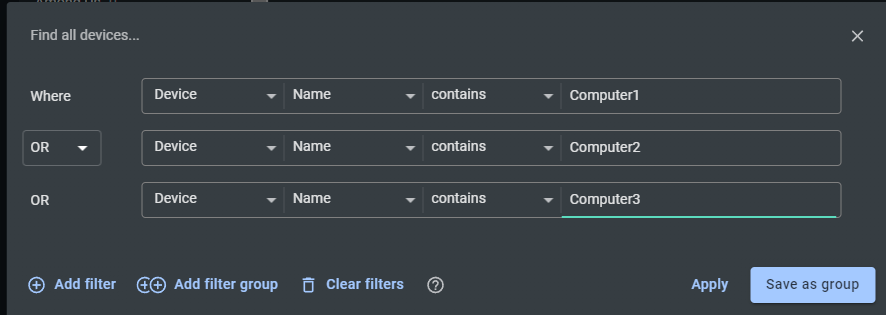
Hope that helps.
Yeah that works. But causes data redundancy. Whenever a users license changes, we need to update multiple groups. Instead of updating one group as the source of truth and referencing it.
Do you know if these filters are planned to be added in the future and if not can I request that they are?
There is an existing feature request for a group membership filter, and I've linked this post to it. Appreciate the feedback
Andrew 👍 😁